【基础】图像金字塔操作
在openCV中,提供了上下采样的函数供使用,下面分别介绍。
1. pyrDown函数
[ˈpɪrəmɪd]
OpenCV提供了函数cv2.pyrDown(),用于实现图像高斯金字塔操作中的向下采样,其语法形式为:
dst = pyrDown(src, dst=None, dstsize=None, borderType=None)
dst:目标图像src:原始图像dstsize:目标图像的大小borderType:边界类型,默认值为BORDER_DEFAULT。
默认情况下,输出图像的大小为(src.cols+1)/2 × (src.rows+1)/2。在任何情况下,图像尺寸必须满足如下条件:
abs(dst.width * 2 - src.cols) <= 2
abs(dst.height* 2 - src.rows) <= 2
cv2.pyrDown()函数首先对原始图像进行高斯滤波变换,即获取原始图像的近似图像,然后再抛弃偶数行和偶数列来实现向下采样。
程序演示
"""
Author: Will Wang
Email: WillWang1998@163.com
"""
import cv2

image = cv2.imread('lena.jpg', cv2.IMREAD_GRAYSCALE)

dst1 = cv2.pyrDown(image)
dst2 = cv2.pyrDown(dst1)
dst3 = cv2.pyrDown(dst2)

print(f'the shape of image is: {image.shape}')
print(f'the shape of dst1 is: {dst1.shape}')
print(f'the shape of dst2 is: {dst2.shape}')
print(f'the shape of dst3 is: {dst3.shape}')

cv2.imshow('image', image)
cv2.imshow('dst1', dst1)
cv2.imshow('dst2', dst2)
cv2.imshow('dst3', dst3)

cv2.waitKey(0)
cv2.destroyAllWindows()
通过对lena.jpg进行三次下采样,得到 dst1,dst2,dst3三幅下采样结果图像,并读取它们的shape属性:
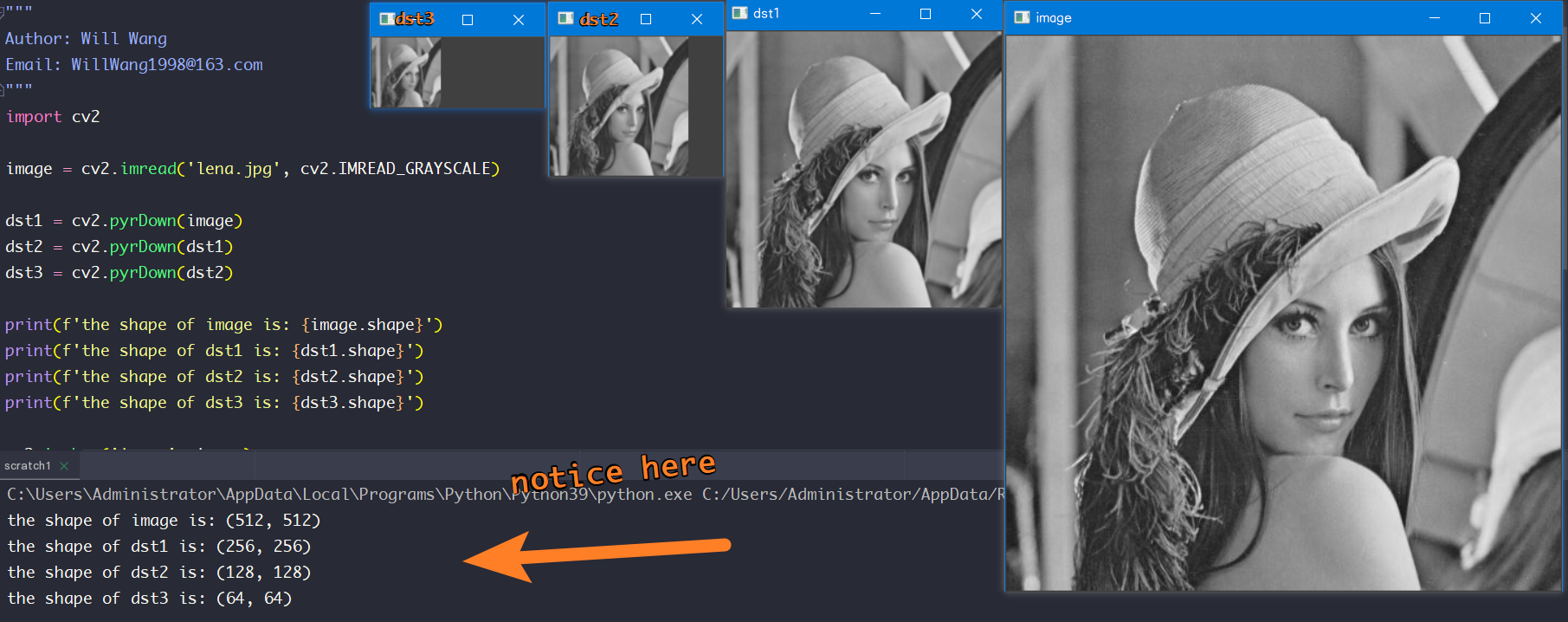
可以看到,经过向下采样后,图像的高宽分别变为原来的一半,图像的分辨率相应地变低。
2. pyrUp函数
OpenCV提供了函数cv2.pyrUp(),用于实现图像高斯金字塔操作中的向上采样,其语法形式为:
dst = pyrUp(src, dst=None, dstsize=None, borderType=None)
dst:目标图像src:原始图像dstsize:目标图像的大小borderType:边界类型,默认值为BORDER_DEFAULT。
默认情况下,输出图像的大小为src.cols*2 × src.rows*2。
cv2.pyrUp()函数的采样过程是:对图像向上采样时,在每个像素的右侧、下方分别插入零值列和零值行,得到一个偶数行、偶数列(即新增的行、列)都是零值的新图像。然后用高斯滤波器对新图像进行滤波,得到向上采样的结果图像。需要注意的是,为了确保像素值区间在向上采样后与原始图像保持一致,需要将高斯滤波器的系数乘以4。
程序演示
"""
Author: Will Wang
Email: WillWang1998@163.com
"""
import cv2

image = cv2.imread('lena.jpg', cv2.IMREAD_GRAYSCALE)
image = cv2.resize(image, (64, 64))

dst1 = cv2.pyrUp(image)
dst2 = cv2.pyrUp(dst1)
dst3 = cv2.pyrUp(dst2)

print(f'the shape of image is: {image.shape}')
print(f'the shape of dst1 is: {dst1.shape}')
print(f'the shape of dst2 is: {dst2.shape}')
print(f'the shape of dst3 is: {dst3.shape}')

cv2.imshow('image', image)
cv2.imshow('dst1', dst1)
cv2.imshow('dst2', dst2)
cv2.imshow('dst3', dst3)

cv2.waitKey(0)
cv2.destroyAllWindows()
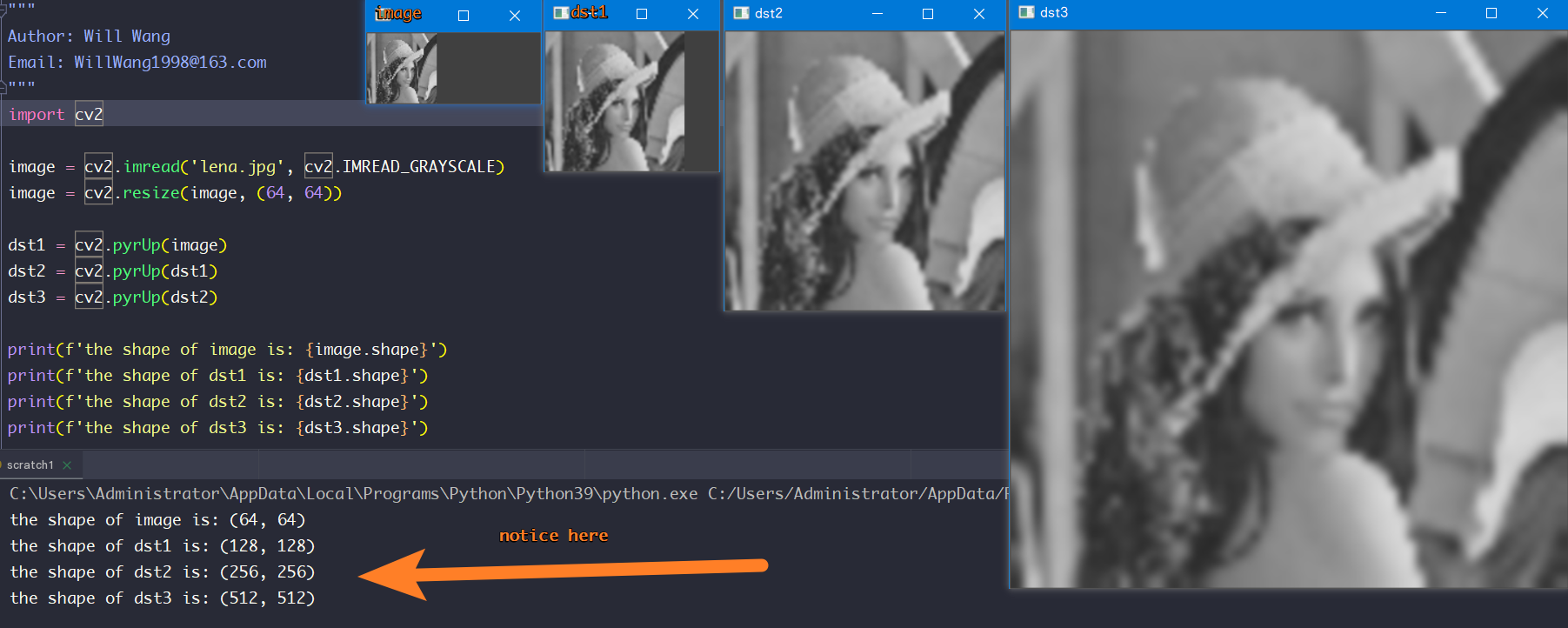
从上述输出结果可知,经过向上采样后,图像的宽度和高度都会变为原来的2倍,图像整体大小会变为原来的4倍。